


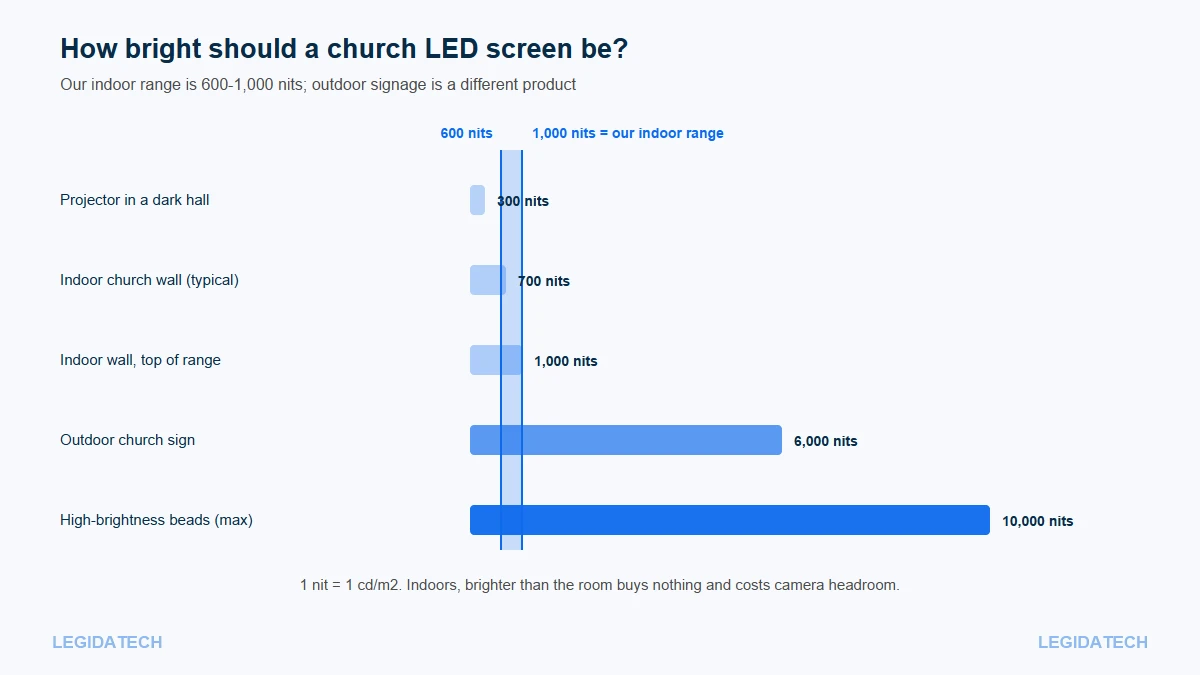
Brightness is the specification church teams adjust most often and understand least. A wall that looks perfect in a showroom can glare through a dim evening service and blow out every camera on the livestream — not because it is faulty, but because nobody set it for the room. Our indoor church walls run 600-1,000 nits and should be operated at 30-50 percent most of the time; getting that right matters more than buying a brighter screen.
Quick Answer: 600-1,000 Nits, Run at 30-50 Percent
Quick Answer: Indoor church walls are specified 600-1,000 nits and run at 30-50 percent; outdoor signage needs 5,000-6,000 nits; 10,000 nits is for direct sunlight, not sanctuaries.
If you send us your service schedule we will suggest preset levels for each part of it. The number on a datasheet is the maximum the wall can produce on a test bench. The number that matters on Sunday is the operating level your team sets, and those two are far apart in normal use.
What a Nit Is
A nit is one candela per square metre (1 nit = 1 cd/m²) — a measure of how much light a surface emits from a given area. Because an LED wall emits light from every pixel, nits describe it directly. A projector’s output is described in lumens instead, which measure total light leaving the lens, so the two figures are not interchangeable.
High-brightness LED beads can reach roughly 10,000 cd/m². That ceiling exists for outdoor advertising, where the screen competes with direct sunlight. An indoor sanctuary is the opposite environment: the room is darker than the wall, so the wall has to come down to match.
Why Brightness Numbers From Different Products Do Not Compare
Three different things get called “brightness”, and mixing them is how churches end up with the wrong screen:
- Wall brightness (nits) — surface luminance of the LED product.
- Projector output (lumens) — total beam output, which changes with screen size and throw distance.
- Peak vs sustained — a datasheet figure may be a short-duration peak, while the wall runs lower in service.
Our engineering team checks these three separately on every project, because churches routinely compare a lumen figure with a nit figure and conclude the wrong screen is brighter. Practical consequence: when a projector salesman says 8,000 lumens and an LED supplier says 1,200 nits, neither number answers “which is brighter in this room”. The only comparable question is how each looks on your wall, in your lighting, at the operating level you will actually use.
The Indoor Brightness Table by Room and Use
| Church space | Typical brightness | Typical operating level | What drives the choice |
|---|---|---|---|
| Chapel, prayer room | 600-800 nits | 25-40% | Dim room, close viewers, no daylight |
| Sanctuary, controlled light | 600-800 nits | 30-50% | Lyrics legibility with moderate stage light |
| Sanctuary with daylight | 800-1,000 nits | 50-70% | Windows: top of the indoor range plus shading |
| Lobby and foyer | 800-1,000 nits | 50-70% | Ambient daylight, viewed from 2-4 m |
| Outdoor sign | 5,000-6,000 nits | 60-100% | Direct sun, long viewing distance |
Notice the pattern: the brighter the room, the higher the specification and the higher the operating level. What never happens is a sanctuary needing its wall at maximum. If a supplier recommends the brightest possible screen for an indoor room, ask what problem that solves.
How Bright Is Too Bright? Three Symptoms
There is no single nit threshold for “too bright”, because it depends on the room. The symptoms are easier to recognise than the number.
Eye Strain and Washout in the Room
The first sign is that people squint or look away during long lyric sections, and the stage behind the screen goes dark by comparison. A wall at full output in a 200 lux room makes everything else invisible, including the worship team’s faces. The fix is not a different screen but a lower preset.
Camera Overexposure on the Stream
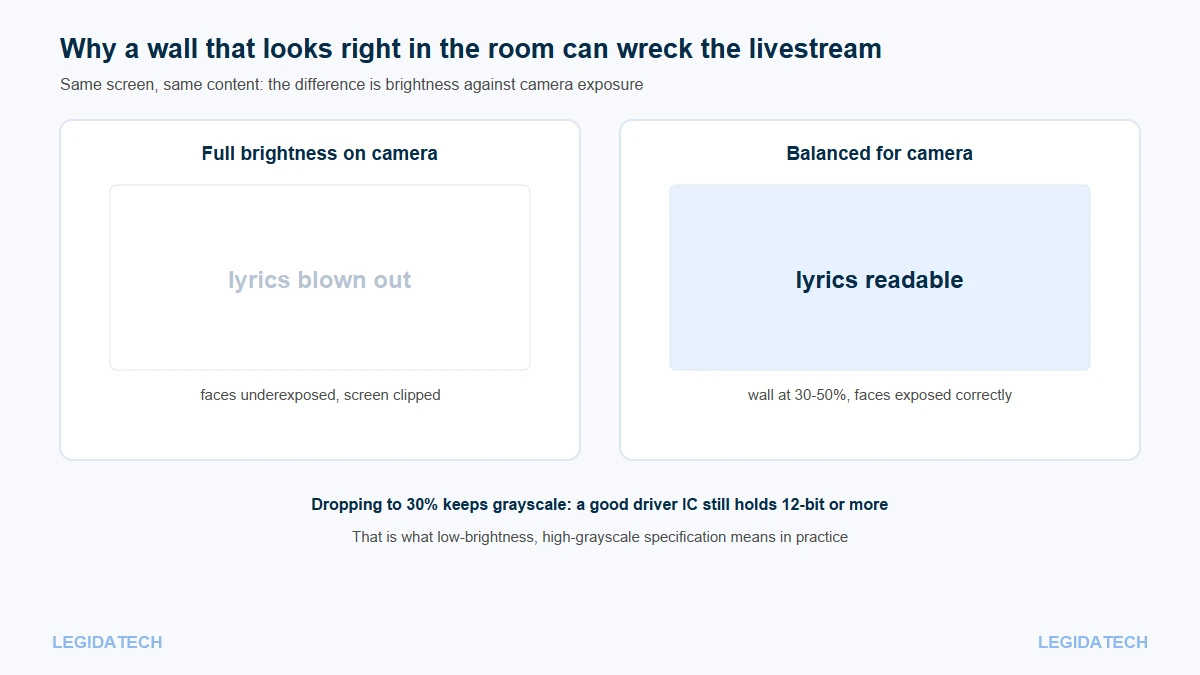
The second sign is on the livestream: lyrics render as solid white blobs while faces sit in shadow. Cameras expose for a scene, and a self-emissive wall at full brightness is usually the brightest object in it. Lowering the wall to 30-50 percent lets the camera expose for faces while the lyrics stay readable — a change that improves the stream more than any camera upgrade.
Low-Brightness High-Grayscale: The Spec That Fixes Both
Here is the trap. On a cheap driver configuration, dimming the wall also flattens the image: gradients band, dark scenes turn blotchy, and skin tones break up. That is why churches sometimes keep walls too bright — lowering them makes the picture look worse.
The specification that solves it is called low-brightness, high-grayscale: keeping deep grayscale even at low output. Industry practice is to require at least 12-bit at around 30 percent brightness. Sixteen-bit control gives 65,536 steps per colour channel, which is the headroom that lets a dimmed wall still render smooth gradients. Ask for the figure explicitly; a sheet that lists only “16 bit” at full brightness has not told you what happens at 30 percent.
The LED screen glossary explains bit depth and grayscale, and the spec sheet guide shows where those rows usually hide.
Calibration Practice: Three Presets
In our church projects the over-brightness complaints almost always disappear once presets exist, because the wall stops being operated at one fixed level all week. The most useful thing a church can do after installation is set three presets and label them in plain language for volunteers:
- Daylight service — the brightest preset, used when windows are open and the room is full of ambient light.
- Normal service — the default, typically 30-50 percent, balanced for the room and the camera.
- Evening or prayer — the dimmest preset, for candlelight services, prayer meetings and reflection segments.
Name them for the situation, not the percentage, because volunteers rotate and the person running the desk next month did not attend commissioning. A one-page sheet with three buttons and their use cases prevents most over-brightness complaints.
Brightness and Power Consumption
Brightness is not linear in cost at the wall level, but it is at the electrical level: running at half output reduces consumption noticeably, and it extends the life of the power supplies that are already the most common failure point. Cabinet power supplies typically accept 100-240 V AC at 50/60 Hz with rated output between 150 W and 400 W each, and a mid-size sanctuary wall usually needs dedicated circuits rather than a building upgrade.
Controller and power ratings published by control-system makers such as NovaStar are a useful cross-check when a quote names a processor. For budgeting, ask for both maximum and average consumption per square metre. The average is the number your board should see, because it reflects how the wall is actually used; the price quick guide shows how power and other line items move the total.
Frequently Asked Questions About Church LED Screen Brightness
How many nits should a church LED screen have?
Our indoor church range runs 600-800 nits, with 800-1,000 nits on the P3.076 and P4 configurations, and most sanctuaries operate at 30-50 percent of that. Rooms with strong daylight sit at the top of the indoor range and add shading rather than brighter modules. Outdoor signage is a different product at 5,000-6,000 nits, because it competes with direct sunlight rather than stage wash.
Is brighter always better for a church screen?
No. Indoors, excess brightness causes eye strain, hides the stage and blows out cameras. The useful specification is a brightness range plus the ability to run dim without losing grayscale. Buying maximum nits for an indoor room spends money on a problem the church does not have. Specify the range and the dimming behaviour instead.
Why do our lyrics look white on the livestream?
Because the camera is exposing for the wall rather than for faces. Lowering the wall to 30-50 percent and letting the camera expose for the room usually restores the lyrics. If dimming makes the picture blotchy, the screen lacks low-brightness high-grayscale capability and cannot hold detail when dimmed.
What does 1 nit equal?
One nit equals one candela per square metre, written 1 cd/m². It measures how much light a surface emits from a given area, which suits self-emissive LED walls and not projectors, whose output is measured in lumens at the lens. The two units cannot be compared directly. Convert only when you know the screen size, gain and throw distance together.
What is low-brightness high-grayscale?
It is a driver and control configuration that keeps deep grayscale when the wall is dimmed. Industry practice is to hold at least 12-bit at around 30 percent brightness. Churches need it because most services run well below full output, and cheap configurations lose image quality exactly there.
Should brightness be different for different services?
Yes, and presets make that practical. A daylight service with open windows needs more output than an evening prayer meeting. Three labelled presets, daylight, normal and evening, cover most church calendars and give volunteers a simple decision instead of a slider they do not understand. Label the buttons in the plainest possible language.
Does lower brightness save electricity?
Yes, and it also reduces thermal stress on power supplies, which is where LED walls most often fail. Cabinet supplies typically accept 100-240 V AC with 150-400 W rated output each. Ask for average consumption per square metre to estimate running cost realistically rather than from the maximum figure.
Can brightness be adjusted after installation?
Yes, through the control software or processor, and it should be. Brightness is not a fixed installation parameter but a weekly operating decision. What cannot be changed later is the wall’s maximum and its grayscale behaviour when dimmed, so both belong in the specification. Presets are the part volunteers actually touch.
Why does my wall look washed out in daylight?
Either the wall is under-specified for the room, or it is running low while windows are open. Rooms with significant daylight need the top of the indoor range, around 1,000 nits, plus shading or an outdoor-rated module; a 600 nit wall will look flat against a bright window. Check the nits figure against the window wall before you sign.
Do outdoor church signs need different brightness controls?
They need both higher maximum brightness and scheduling, because a 5,000-6,000 nit sign left at full output overnight is unpleasant for neighbours and wasteful. Outdoor installations should include a day and night schedule or an ambient-light sensor alongside the IP65 sealing that protects the cabinets. Ask whether scheduling is included or costs extra.
Next Step: Set Your Wall for the Room
Brightness is the least expensive quality improvement available to a church, because it is a setting rather than a purchase. Two things are worth doing this month: confirm the wall’s brightness range and its grayscale behaviour when dimmed, and set three presets your volunteers can name.
If you are still specifying a screen, send us your room dimensions, window situation and whether you livestream, and our engineering team will recommend a brightness range and operating presets — or request a phone call. For how brightness fits the rest of the decision, read the complete buying guide and the 4K resolution guide.


